SOFTWARE · MY EXPERIENCE
Aiarty Image Enhancer Review
Great value for money – but Topaz remains ahead when it comes to sharpness and fine details.
Good image enhancement doesn't necessarily have to come with an expensive subscription. That's precisely why I find Aiarty Image Enhancer interesting. The program offers a great deal for its price. In my comparisons, however, Topaz still performs in a different league when it comes to image quality – especially sharpening. Aiarty scores points for me with its excellent price-performance ratio and support that responded to my emails within a few hours.
My impression
An interesting and attractively priced alternative for image enhancement.
Topaz remains in the lead
I see a clear advantage for Topaz, especially when it comes to sharpening and fine feather details.
What bothers me
The preview can only be reduced to 50 percent for me. I'm missing a direct Photoshop integration.
Very positive
The support team always responded to my emails within a few hours.
Why I watched Aiarty
I purchased Aiarty Image Enhancer myself. This report describes my experiences with the software and my own images.
In wildlife photography, challenging lighting, high ISO settings, and cropping large files are commonplace. If a program reduces noise while simultaneously enhancing detail, it can be incredibly helpful for post-processing. Topaz is a key benchmark for me in this regard. At the same time, I enjoy exploring the capabilities of more affordable programs.
For me, Aiarty therefore has to answer two questions: How good will my images actually be – and how much do I get for what price? My answer varies. For that last bit of image quality, I prefer Topaz. However, when it comes to the cost-benefit ratio, I find Aiarty very, very good.
The functions: more than just noise removal
According to the manufacturer, Aiarty combines noise reduction, sharpening (or improvement of blurry images), JPEG artifact reduction, and AI-powered upscaling. Editing at original size as well as scaling to two, four, or eight times the original size are part of the concept. In addition, it offers various AI models and controls for adjusting the intensity of the processing.
The current manufacturer's overview also mentions color and exposure corrections, face restoration, and an AI eraser. These are additional features of the current product version; my assessment here focuses on the bird images and my own editing workflow. The available functions may depend on the installed version.
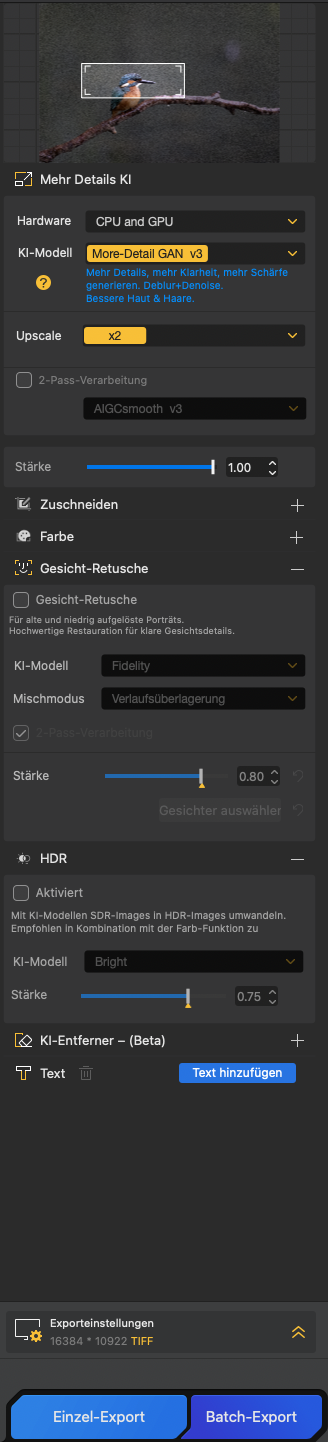
A look at my settings
My additional screenshot shows the AI model "More-Detail GAN v3", the hardware selection "CPU and GPU", a magnification of x2, and a strength of 1.00. Sections for color, face retouching, HDR, an AI remover (in beta), and text are also accessible. Single and batch export are available at the bottom; TIFF is displayed as the export format.
Face retouching and HDR are not enabled in this view. Not every visible function was applied to the bird image. For me, the overview primarily shows how many adjustable parameters the program already offers.
Especially with feathers, I'm interested in whether a structure remains believable. A visibly crisper outline alone doesn't necessarily make a better image for me. A smooth background isn't enough either if small details in the subject become too soft. With generative reconstruction, I also check whether the newly appearing structures still suit the photographed animal.
Function Overview: Aiarty Image Enhancer at the Manufacturer.
Aiarty and Topaz: My Comparison with the Kingfisher
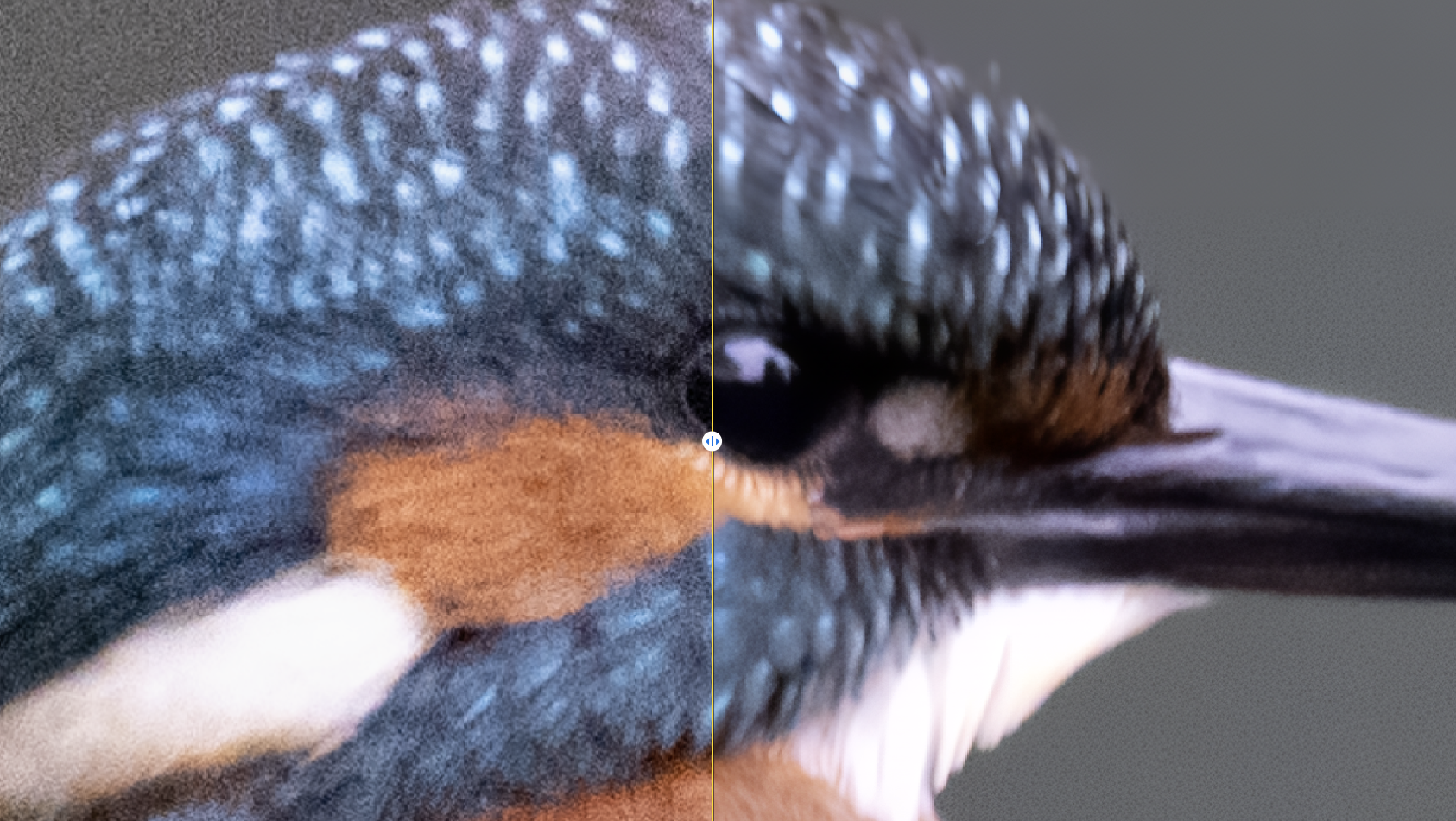
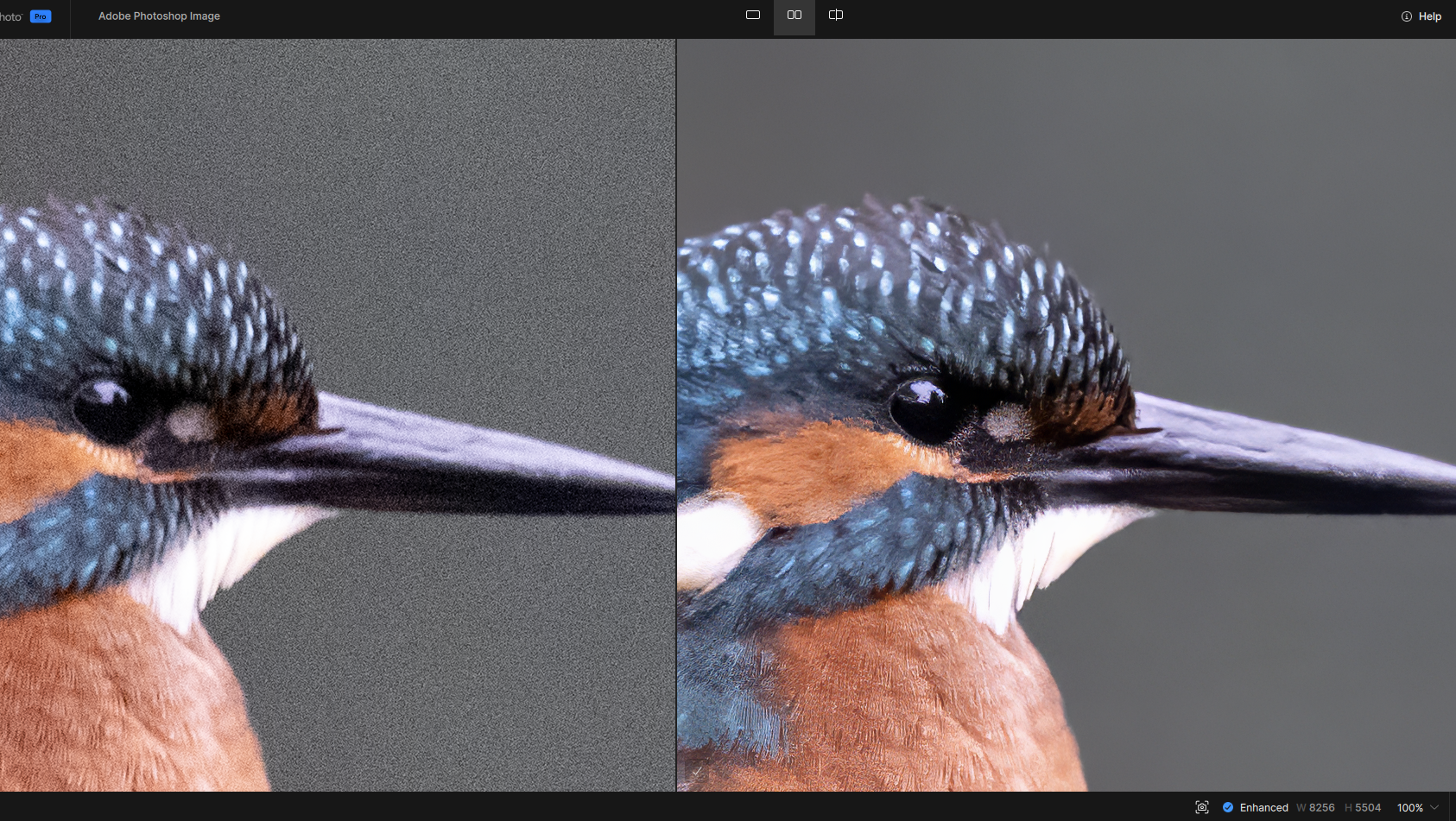
What I find particularly striking about the kingfisher is how differently the two programs bring out fine details. Aiarty improves the image and can visibly reduce noise. In my comparison, however, the result appears softer. Topaz separates small feather structures much better, in my opinion, and brings more clarity to the head area.
This is where I see the difference most clearly: Topaz sharpens much better in my examples. The fine lines and the detail around the eye appear more defined. For my own editing, this is more important than simply having the smoothest possible background.
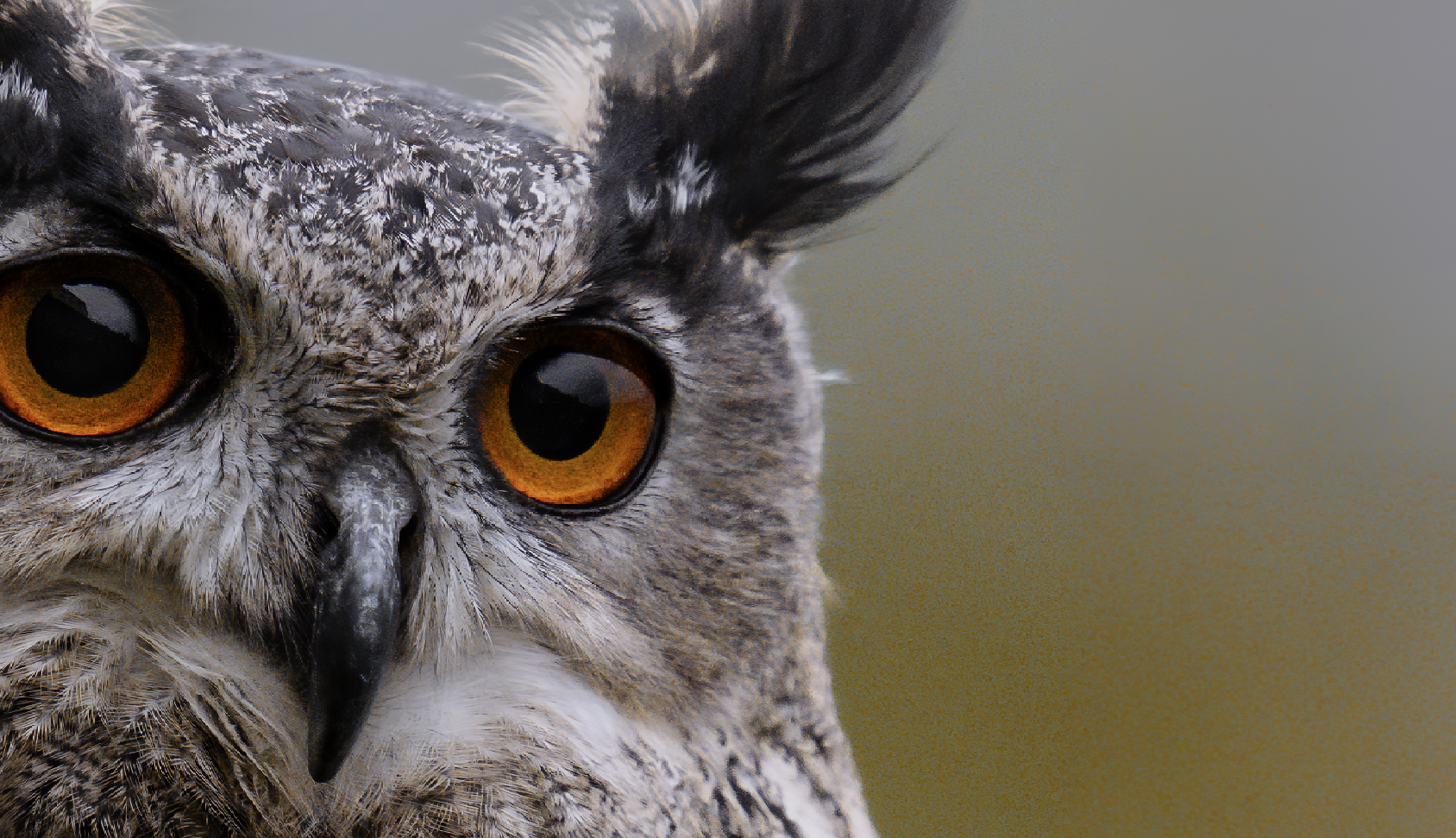
Topaz also has the edge for me in terms of sharpness with the owl.
With the owl, I pay particular attention to the eye and the surrounding plumage. Aiarty delivers a quite interesting result for the price. In direct comparison, however, I prefer the definition of the fine feathers in Topaz. The structures appear more precisely separated, and the post-sharpening is more convincing.
When looking at the owl images, it's also worth taking a closer look at the areas beside the bird: Artifacts and restless, mottled structures are still clearly visible in the greenish background. These areas are particularly noticeable in the Aiarty example. Therefore, I don't just judge the sharpness at eye level, but also how clean the surrounding areas appear. A sharper-looking subject doesn't automatically make such background disturbances less noticeable.
For the examples I've shown, Topaz remains the superior solution if I want to achieve the best possible sharpness and detail. This is my assessment of these edits, not a statement that Aiarty will necessarily perform worse with every subject and setting.
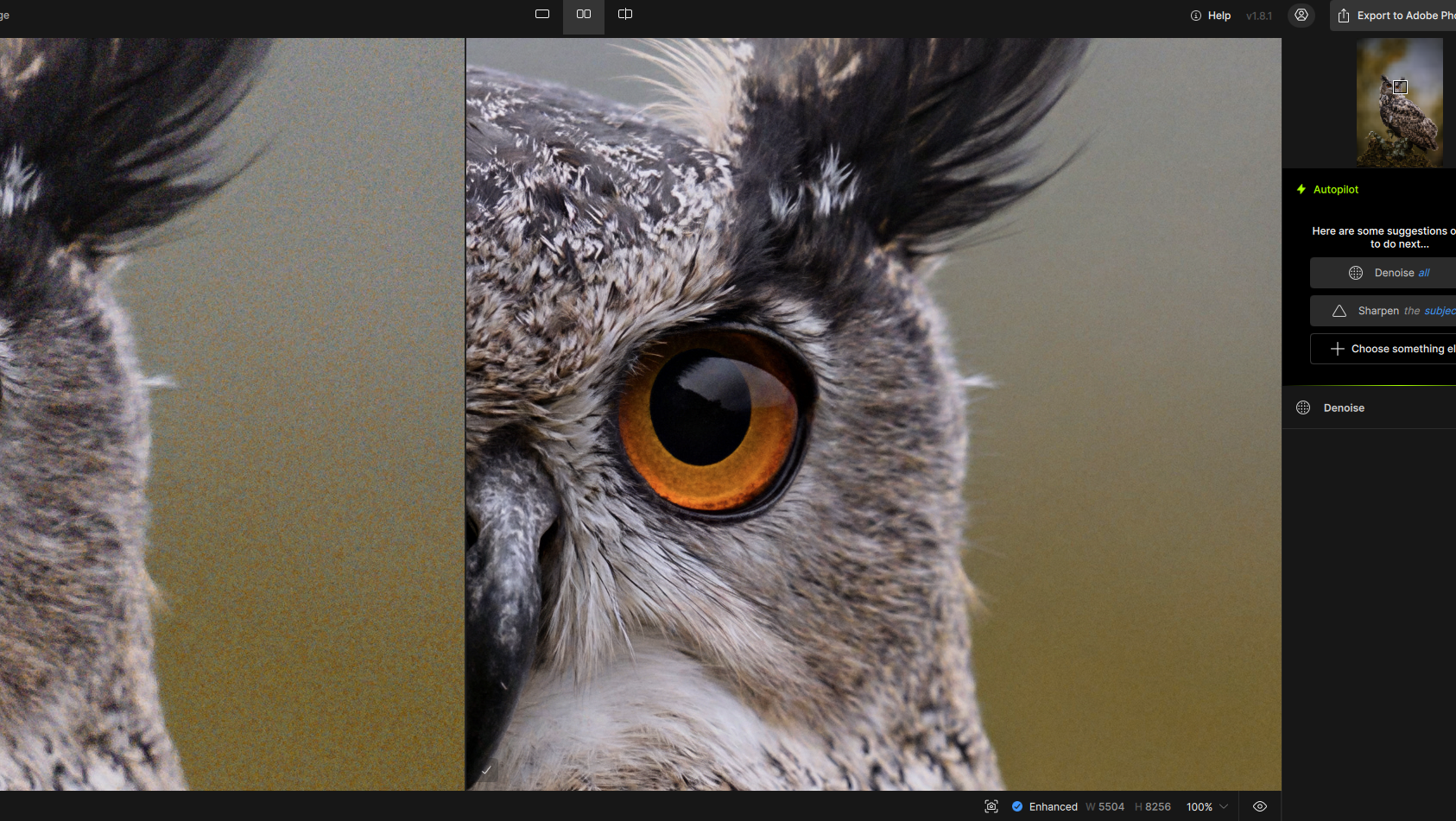
The four images are unaltered screenshots of my edits. Cropping, display scale, and preview types differ. They show my results and my impression of the image; they are not a pixel-perfect lab test. On the website, they are resized for layout purposes; clicking on each screenshot opens the respective screenshot file.
The price is a strong argument in favor of Aiarty.
The fact that Topaz delivers better results for me doesn't automatically make Aiarty uninteresting. Especially when I look at Topaz's current costs, I find Aiarty's price-performance ratio exceptionally good. Someone who only wants to enhance images occasionally might evaluate the ongoing cost of software quite differently than someone who uses it daily.
| Offer | Price on November 15, 2026 | Licensing model |
|---|---|---|
| Airarty Standard | $59 per year | Annually renewing subscription |
| Airarty Lifetime | Starting at $99; the page also shows $109 depending on the license option. | One-time payment; lifetime updates according to the provider. |
| Topaz Photo Personal, paid annually | $169 in the first year of the promotion instead of the regular $199 per year | Annual subscription, not a perpetual license |
| Topaz Photo Personal, monthly | $39 per month | Subscription that can be cancelled monthly |
This is a snapshot of publicly displayed US dollar prices; it does not reflect my personal purchase price. Aiarty displays prices excluding taxes. Final price, currency, license scope, and renewal terms should be verified at checkout. Sources: AIARTY licenses and Topaz prices.
For me, the most appealing aspect is choosing a perpetual license. I can use the software indefinitely without having to commit to a new subscription every year. At the same time, I'm comparing Aiarty here with the standalone desktop application Topaz Photo, not with a larger Topaz suite full of additional programs. This keeps the price comparison meaningful for the actual photo editing functionality.
My biggest criticism: I don't see the whole picture.
What bothers me most about Aiarty is the minimum zoom level in the version I tested. The smallest numerical zoom level I can select is 50 percent. With my large image files, this isn't enough in my current workflow to see the entire photo in the preview window.
When editing, I want to be able to switch between two perspectives: detailed control and the overall impression of the image. A single feather area might look good, while the effect in the complete photo is less convincing. For this, I need a view that adjusts the image to the window size, or a smaller zoom level. The lack of this overview feels like an unnecessary limitation in my daily work.
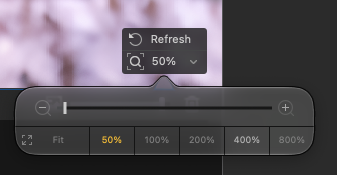
My screenshot shows the percentage levels as well as the "Fit" option. My criticism therefore relates to the lower limit of the numerical zoom and the fact that my current workflow lacks the desired overall view. I still need to specifically test whether "Fit" reliably provides this view in my setup.
Photoshop and layers: I'm missing the direct connection here.
The second major shortcoming concerns my workflow in Photoshop. In my tested setup, I can't launch Aiarty directly from within Photoshop. A suitable plugin integration is missing – especially when working with layers.
I want to directly transfer the layer to be edited for image enhancement and then use the result back in my Photoshop document. Exporting separately, switching to another program, and then re-pasting it are extra steps for me. That's not as convenient as direct integration.
The Aiarty manual lists TIFF and DNG as possible export formats. However, for me, exporting a file does not replace launching the enhancement tool from Photoshop and returning its result directly to the document. Such integration is therefore high on my wish list.
Export options according to AIARTY HandbookThe statements regarding Zoom and Photoshop describe my own tested workflow.
I sincerely hope that Aiarty will offer its software as a Photoshop filter in the future. For my professional workflow with layers, this direct connection is crucial: I want to access the image enhancement from Photoshop and continue editing the result in my document without cumbersome file switching. Only then would Aiarty integrate seamlessly into my workflow.
Very positive: Support responses within a few hours
Aiarty's support has made a very good impression on me. I have always received a response to my emails within a few hours. I find this extremely positive.
Especially if something about the operation bothers me or I'm missing a feature, I don't want my questions to go unanswered for days. A quick response doesn't replace an additional feature, but it shows me that my request is being addressed. My experience with response times has been consistently good.
For whom is Aiarty sufficient?
My personal assessment is that Aiarty should be sufficient for around 90 percent of photographers and deliver very good results. This isn't a statistically determined figure, but rather my impression of the relationship between what many people need in everyday use and what the software offers for its price.
However, those who are looking for the finest details and particularly convincing sharpening in challenging bird subjects should take a close look at the difference compared to Topaz. For me, this quality advantage remains apparent. Nevertheless, Aiarty may be the more economically attractive choice for many users.
My rating at a glance
| Value for money | Very good for me, especially considering the perpetual license. |
|---|---|
| Sharpness and detail | Topaz is clearly ahead in my comparisons. |
| Image overview | The minimum numeric zoom level of 50 percent is inconvenient for me. |
| Photoshop workflow | I miss direct integration for working with layers. |
| Support | Very positive: My emails were answered within a few hours. |
MY VERDICT
Great value for money – with clear limitations
I find Aiarty Image Enhancer to be very, very good value for money. The program is an exciting option if I want to improve images and keep an eye on the ongoing costs of a more expensive solution. I was also particularly impressed by the fast support.
However, when it comes to the image quality of my bird photos, Topaz is still in a different league for me. I see a clear advantage, especially in sharpening and bringing out fine feather details. Anyone with the highest demands in these areas should take this difference into account when making their decision.
For Aiarty, I'd like to see a full image view and, most importantly, direct Photoshop integration. With these improvements, the program would fit much better into my workflow. It's already interesting to me – especially because of the excellent value for money. I'm very curious to see how the software develops further. Above all, I'm hoping for a Photoshop filter that truly integrates working with layers into my workflow.
View Aiarty on the manufacturer's website