TESTS & EXPERIENCES
Topaz Photo AI: A Real-World Test
An essential tool for my wildlife photography
Few genres of photography are as unpredictable as wildlife photography. The light is poor, the animal is moving and the shutter speed still needs to be fast – so you quickly end up using ISO settings you would probably never choose for a landscape photograph.
That is exactly why Topaz Photo AI has become one of the programs I would not want to be without in my editing workflow.
Of course, the software offers far more than a single feature. Images can be sharpened, details enhanced and resolution increased. But if I had to choose the feature that makes Topaz Photo AI especially valuable to me as a wildlife photographer, the answer would be clear: noise reduction.
Personally, I have not found anything better so far.
Why noise is almost unavoidable in wildlife photography
Photographers who only work with wildlife in perfect light naturally have an easier time. My reality often looks very different.
Many animals are particularly active early in the morning or late in the evening. I also photograph in forests, under overcast skies or when the subject remains in the shade. At the same time, I cannot simply keep extending the shutter speed.
When a bird suddenly takes off or an animal moves quickly, I need a correspondingly fast shutter speed. If there is not enough light, only one option remains: raise the ISO.
ISO 3200, 6400 and even higher values are therefore not unusual in wildlife photography. Modern cameras deliver impressive image quality, but at some point noise becomes visible. This is where the real strength of Topaz Photo AI begins for me.
Noise reduction is the highlight for me
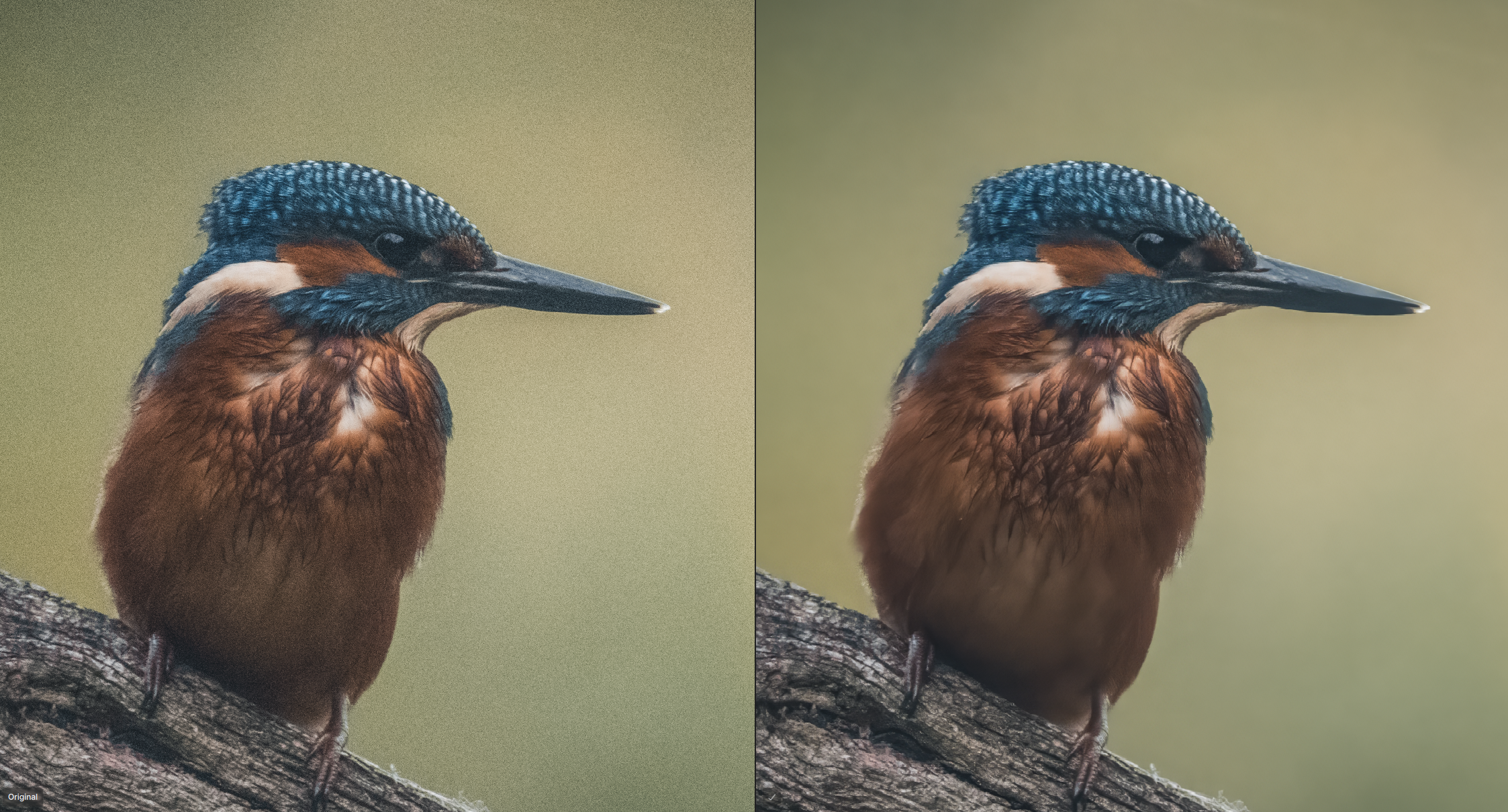
Many programs can reduce image noise. For me, the real challenge is removing that noise while preserving the animal's fine details.
Aggressive noise reduction can make an image look wonderfully clean, but feathers, fur texture and the finest details disappear at the same time. The result can quickly look smooth, artificial or almost painted.
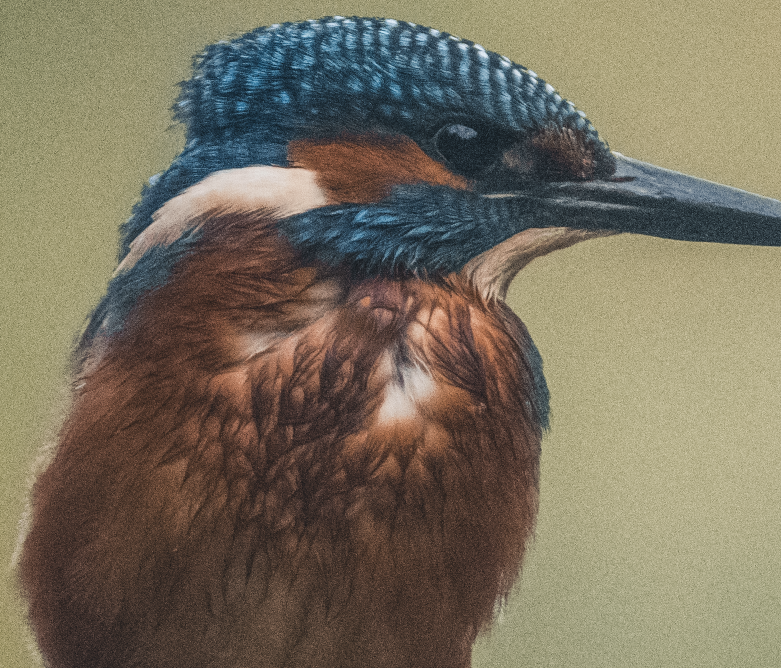
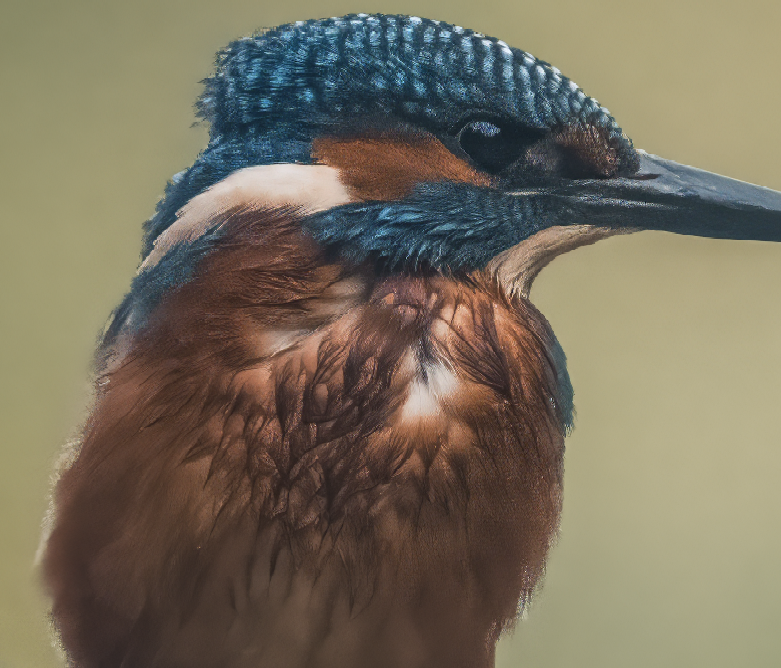
This is exactly where Topaz Photo AI wins me over: The noise disappears while a remarkable amount of detail is preserved. I find this especially impressive with birds. The finest feather structures are crucial to the impact of a wildlife photograph.
Why this matters so much to wildlife photographers
Good noise reduction genuinely changes the way I can work outdoors. I still try to capture the best possible image in camera. No software can replace good light, correct exposure or sound shooting technique.
An animal will not wait for my camera settings to be perfect. When the decisive moment arrives, I want to take the photograph. If that requires ISO 6400, ISO 8000 or even higher, so be it.
I would rather capture the special moment at a high ISO than have no photograph at all.
With Topaz Photo AI in mind, I worry far less about high ISO settings because I know what is still possible in post-processing. That is why I now consider truly good AI noise reduction essential for wildlife photographers.
RAW WORKFLOW
RAW Denoise – especially useful for Nikon RAW files
Anyone shooting RAW should take a close look at RAW Denoise . Topaz processes the original RAW data and addresses noise during RAW development itself.
The workflow is important: The original RAW file should be opened directly in Topaz Photo AI. Only then can RAW Denoise access the original sensor data.
RAW Normal is available for regular RAW images, while RAW Strong is designed for particularly noisy photographs taken at very high ISO settings.
Normal, Strong, Extreme and Denoise Max
Different models are also available outside the dedicated RAW workflow, so every image does not have to be processed with the same intensity.
| Model | Best suited to |
|---|---|
| Normal | Light to moderate noise |
| Strong | Pronounced noise and low-light images |
| Extreme | Very heavy noise |
| Denoise Max | Demanding images requiring AI-based detail reconstruction |
I like this flexibility very much. Not every image needs maximum noise reduction. With an ISO 1600 photograph I may only want a subtle adjustment, whereas Topaz can work much more strongly on a wildlife image taken at an extremely high ISO.
Denoise Max in particular shows where the technology is heading. Instead of merely removing noise, the model also attempts to reconstruct detail intelligently. Even so, my rule remains: Do not overdo it. In my opinion, good editing should not be obvious at first glance.
Feathers, fur and the finest structures
This is where I decide whether noise reduction is truly good. A uniform sky is relatively easy to clean up; an animal is a completely different challenge.
Feathers contain extremely fine lines and structures, while fur consists of countless individual hairs. Then there are eyes, beaks, claws and other delicate details. Poor noise reduction eventually mistakes these structures for noise and removes them as well.
In my experience, Topaz Photo AI is remarkably good at distinguishing unwanted noise from genuine detail. That is precisely why I find it so well suited to wildlife photography.
The sharpening also impresses me
The second feature I use frequently is sharpening. Topaz can address slight softness or motion blur. Of course, it cannot turn a completely out-of-focus image into a perfect wildlife photograph, but it can recover a surprising amount when an eye or the plumage looks just a little soft.
I find Noise-Aware Sharpening particularly interesting. Conventional sharpening often sharpens not only the animal but also the existing noise. An intelligent combination of denoising followed by sharpening makes far more sense to me.
Upscaling and cropping
We cannot always get close enough to our subject – and sometimes we should not. Protecting the animals always matters more to me than the photograph. As a result, I sometimes need to crop more heavily later, which reduces the remaining resolution.
Topaz offers tools for upscaling and improving detail. This can be especially helpful when I want to display or print a heavily cropped wildlife photograph at a larger size.
No substitute for a good photograph
Despite my enthusiasm, one point is important to me: Topaz Photo AI does not replace good photography.
I would never deliberately use poor settings and think, ‘AI will fix it later.’ My goal is always to create the best possible image in camera. The right shutter speed, clean exposure, accurate focus and steady camera technique remain essential.
For me, Topaz is the tool that helps me get the very best from a good photograph afterwards. Sometimes it can also save an image that might otherwise have disappeared into the archive because of difficult conditions.
Questions about noise reduction with Topaz Photo AI
What is the most important advantage of Topaz Photo AI for me?
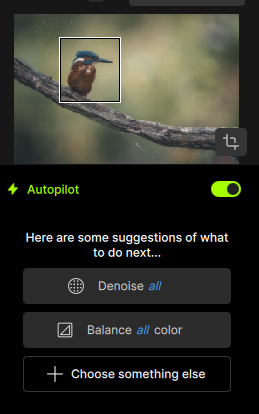
Noise reduction when shooting wildlife with high ISO values is the most important point for me. What is important is not just a smooth background: fine feather and fur structures should be preserved. The kingfisher image examples in the report make this difference understandable.
How do I assess the result of denoising?
It makes sense to compare it with the original image at the same magnification. In addition to the background, the eyes, feathers and other fine structures should be checked in particular. A clean-looking background alone doesn't say whether the editing will help the entire image.
Can the software completely rescue a very blurry shot?
A sharply captured initial image remains the best basis. As described in the report, noise reduction and sharpening can be helpful, but are not a substitute for appropriate exposure times or clean shooting technique. A completely blurry image does not automatically become a detailed image.
Are denoising and sharpening the same task?
No. Denoising is about reducing disturbing image noise, while sharpening is about the perceived detail. The effect of both steps should be assessed together so that the noise is not amplified in addition to the animal details. The function and model names mentioned in the report refer to the software version described.
More practical tests from my wildlife equipment
For me, image editing also includes looking at the shooting conditions. These further tests demonstrate equipment for observation and long focal length support.
MY CONCLUSION
Topaz Photo AI is now an integral part of my workflow
I also appreciate the sharpening and upscaling tools. But if I could name only one reason for recommending Topaz Photo AI to other wildlife photographers, it would clearly be: noise reduction.
I find some of the results at high ISO settings genuinely impressive. Noise is reduced very effectively while important feather and fur structures are preserved. Personally, I do not think there is anything better on the market at the moment.
That is my personal assessment, and every photographer should test different programs using their own images. For my wildlife photography, however, Topaz Photo AI has become essential.
Better a unique moment at ISO 8000 than no photograph at all.